Genshin Impact Storage SOS: How I Freed Up 10GB+ on My Phone in 2026
Genshin Impact storage management tips help mobile fans optimize device space and enjoy smoother gameplay in 2026. Discover game-changing features now!
OMG, you guys! \ud83e\udd2f Let's talk about the REAL struggle of being a Genshin Impact fan in 2026. It's literally the best game ever, but my phone's storage was crying for help with every new update. I was THIS close to buying a whole new device just for Teyvat, which is not my idea of a fun purchase, you know? But guess what? I discovered some life-saving features that are total game-changers (pun intended \ud83d\ude09). HoYoverse has been quietly adding tools to help us manage the ever-growing file size, and today I'm sharing all the tea on how to keep your game running smoothly without sacrificing your photo gallery or other apps!
\ud83d\udd0d Step-by-Step: The Quest Resource Clean-Up
Okay, first things first, the MOST effective trick for mobile players. Did you know you can delete resources from quests you've already completed? It's like Marie Kondo-ing your game files \u2013 if the quest sparks joy in your memory, but the data doesn't, you can thank it and let it go! This feature is a lifesaver, especially after finishing those massive Archon Quests from Sumeru and Fontaine.
Here’s the 411 on how to do it:
-
Tap on Paimon's icon in the top left corner (our favorite emergency food guide! \ud83d\ude0b).
-
Go into Settings (the little gear icon).
-
Select Resources.
-
Look for the Past Quest Resource Management tab.
-
You'll see a list of completed quests. Just hit Uninstall on the ones you're sure you're done with!
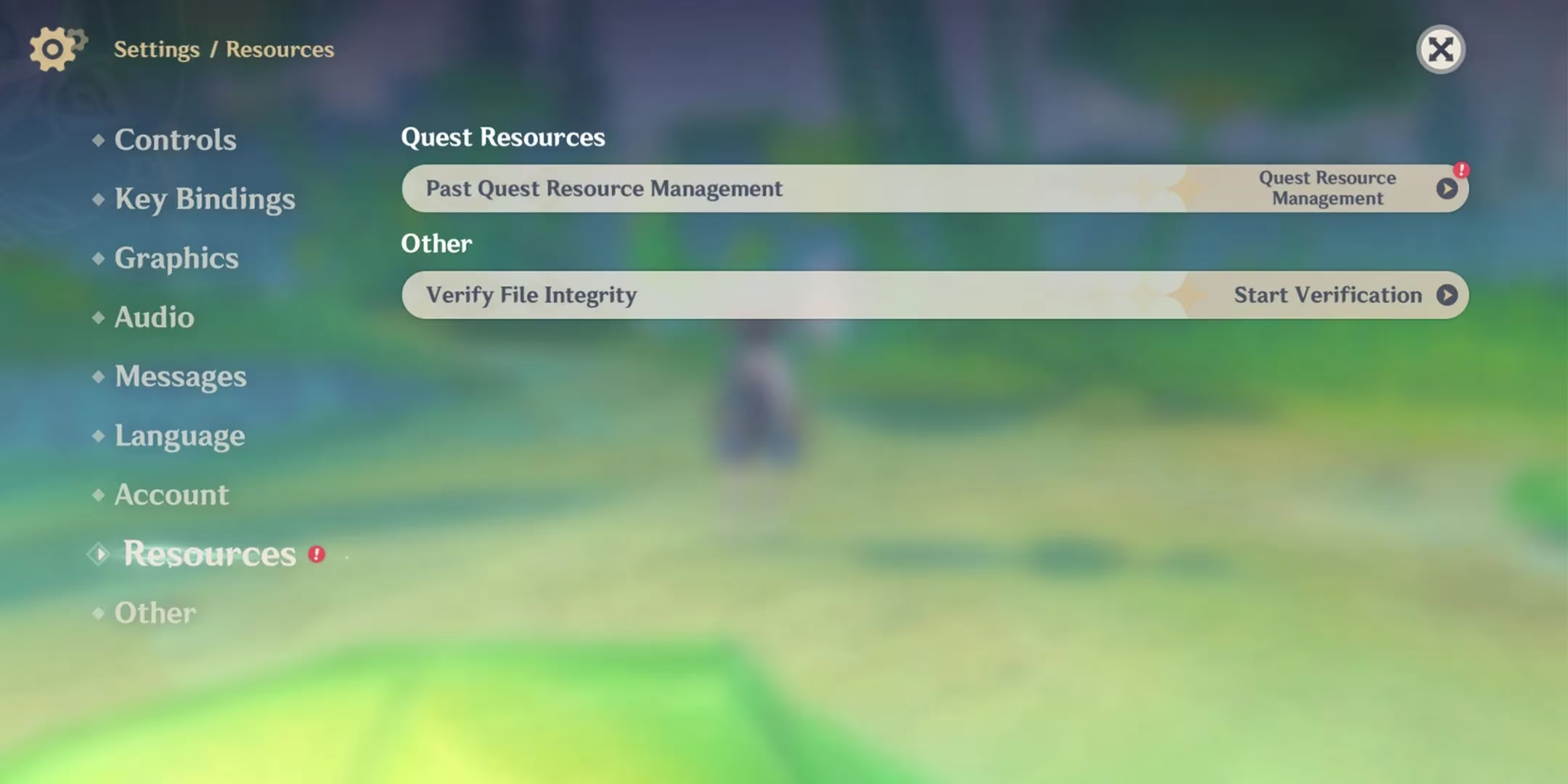
Pro-Tip Alert! \u26a0\ufe0f The game is smart and only shows resources from quests you've actually finished on that specific account. So no worries about accidentally deleting something for a future playthrough on a new character. And if you ever feel nostalgic and want to replay a cutscene, you can just go back and Download Resources Again from the same menu. Easy peasy!
\ud83c\udf10 Bye-Bye Unused Voice-Overs: A Huge Space Saver
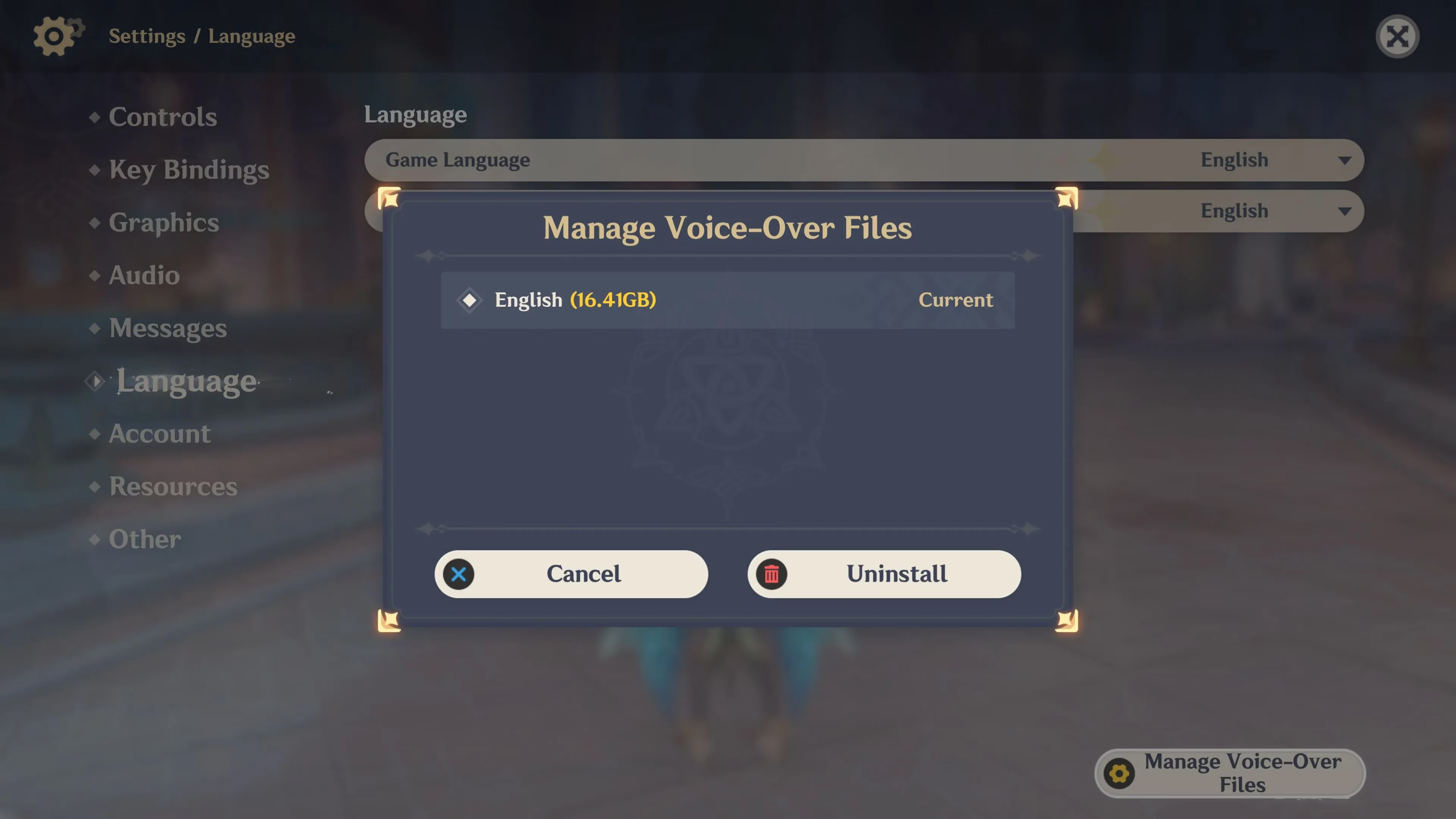
This one is a MAJOR hack. How many languages do you actually play with? For me, it's just English and sometimes Japanese for the vibes. But the game installs ALL the voice packs by default! Deleting the ones you don't use can free up a TON of space.
How to Manage Voice-Over Files:
| Step | Action | Icon/Note |
|---|---|---|
| 1 | Open the Paimon Menu | \ud83d\udc51 Paimon's face |
| 2 | Go to Settings | \u2699\ufe0f Gear icon |
| 3 | Select Language | \ud83c\udf0d Globe icon |
| 4 | Tap Manage Voice-Over Files | A list of languages appears |
| 5 | Uninstall the packs you don't need | Sayonara, extra gigabytes! |
Seriously, this cleared up so much space for me. It's perfect if you're a dedicated EN or CN voice enjoyer.
\ud83d\udee0\ufe0f The Nuclear Option & Other Thoughts
If you've tried all the above and you're still in storage hell, there's one last resort: the full reinstall. Sometimes, over years of patches and updates, files get fragmented or redundant data hangs around. Uninstalling the entire game and downloading a fresh copy can sometimes result in a smaller, more optimized install. It's a bit of a hassle, but for my friend, it saved an extra 3-4GB! Just make sure your account is securely linked first, obvi.
My Personal Storage Win:
-
Before Cleanup: My Genshin was eating up like 25GB+ \ud83d\ude31
-
After Deleting Old Quest Resources: Freed up about 8GB!
-
After Removing 2 Unused Voice Packs: Another 5GB gone!
-
Total Saved: A whopping 13GB! That's like 5,000 more selfies I can take in Inazuma. \ud83d\ude0e
\u2764\ufe0f Final Verdict
Living the Genshin life on mobile in 2026 doesn't have to mean constantly deleting your other favorite apps. These built-in tools are seriously underrated. Just remember:
-
Quest Resources: Safe to delete if you've finished the story.
-
Voice-Overs: Keep only what you listen to.
-
Reinstall: A last-ditch effort that can sometimes work wonders.
Now go forth, explore Natlan without fear, and may your storage always have room for the next big adventure! Happy gaming, besties! \ud83c\udf89\ud83d\ude80
Comments